Live Transcribe Apps for 2026: Our Top 11 Picks
Looking for the best live transcribe app in 2026? Compare 11 top picks for real-time speech-to-text, including options for phone calls, meetings, and accessibility needs.


Understanding Live Transcribe Apps
What is Live Transcription?
Live transcription, often referred to as real-time speech-to-text, is the process of converting spoken language into written text as conversations unfold. Using advanced artificial intelligence (AI) and machine learning algorithms, this technology captures spoken words and turns them into readable text almost instantly.
Unlike post-recording transcription services that require waiting, live transcription supports presence and ease in the moment. It allows people to follow conversations, lectures, meetings, and everyday interactions in real time, helping reduce mental strain and remove communication barriers. At its heart, live transcription bridges the gap between spoken communication and written documentation, creating a more accessible and connected experience for how we live, work, and communicate.
Why Use a Live Transcribe App?
Live transcribe apps support more present, inclusive communication across both personal and professional life.
For individuals with hearing loss, they provide real-time captions that reduce strain and create confidence in conversations.
In work and school settings, these apps allow professionals and students to stay engaged without the pressure of constant note-taking, capturing meetings and lectures accurately for later reflection.
Beyond accessibility, live transcribe apps enhance productivity and connection. Content creators use them to add instant captions to live streams and videos, expanding reach and engagement, while advanced versions support multilingual communication through real-time translation.
By turning spoken language into searchable, shareable text, these tools simplify communication and make everyday interactions more accessible, efficient, and human.

Our Top 11 Picks for Live Transcribe Apps in 2026
1. Nagish Live Transcribe

Overview
Nagish Live Transcribe is a cutting-edge communication application specifically designed for individuals who are deaf or hard of hearing. Nagish, a free FCC-certified caption call app, offers this service to its community at no cost and with minimal setup, making it easy to get started right away.
The app provides real-time, highly accurate transcription of phone calls, transforming spoken conversations into clear, readable text. Designed with accessibility at its core, Nagish integrates with a user’s existing phone system, allowing users to access live captions with just a few taps.
Powered by advanced AI, Nagish processes spoken language into captions with no latency, ensuring conversations feel natural and easy to follow in real time. Its AI engine continuously learns and improves, delivering increasingly accurate transcripts over time while maintaining a simple, intuitive experience for everyday use.
Key Features
- Real-time Phone Call Transcription: Converts spoken words during phone calls into text instantly.
- Speaker Identification: Differentiates between speakers to make conversations easier to follow.
- Customizable Text Size and Contrast: Allows users to adjust display settings for optimal readability.
- Call History and Search: Saves past call transcripts, enabling users to review and search conversations.
- Integration with Phone System: Works directly with your smartphone's calling functionality.
- Emergency Call Support: Ensures accessibility for critical communications.
Pros
- High Accuracy: Designed for critical communication, it boasts excellent transcription accuracy.
- Accessibility-Focused: Tailored features specifically benefit the deaf and hard-of-hearing community.
- Intuitive Interface: Simple and easy to navigate, reducing the learning curve.
- Reliable Performance: Optimized for real-time processing during phone calls.
Best For
Nagish Live Transcribe is best for individuals who are deaf or hard of hearing and require a reliable, accurate, and accessible solution for transcribing phone calls in real time. It is also suitable for businesses and organizations looking to provide enhanced communication tools for their employees or customers with hearing impairments.
2. Otter.ai

Overview
Otter.ai uses AI-powered transcription services with real-time transcription for meetings, lectures, and interviews, providing live transcription and post-event analysis.
Otter.ai aims to make spoken conversations more accessible, searchable, and shareable.
Key Features
- Live Transcription: Provides real-time text transcription during meetings, lectures, and personal conversations.
- Speaker Identification: Automatically identifies and labels different speakers in a conversation.
- AI Meeting Assistant (OtterPilot): Can automatically join virtual meetings, take notes, and share summaries.
- Searchable Transcripts: Enables users to search through entire conversations for specific keywords or phrases.
- Annotation and Highlighting: Users can highlight key points and add comments directly to the transcript.
- Integration with Video Conferencing: Seamlessly connects with popular platforms like Zoom, Google Meet, and Microsoft Teams.
- Export Options: Transcripts can be exported in various formats (e.g., TXT, DOCX, SRT).
Pros
- Accuracy: Generally provides accurate transcriptions, especially with clear audio.
- Good Integration: Integrations with leading video conferencing platforms.
- User-Friendly Interface: Makes it easy for new users to get started.
- Free Tier Available: Offers a free plan that allows users to experience its core features.
- Comprehensive Feature Set: Beyond transcription, it offers tools for collaboration and organization.
Cons
- Accuracy with Background Noise: Otter.ai’s own support documentation notes that transcription quality depends on audio conditions and can vary with factors like background noise, speaker accents, and conversation complexity. This means accuracy can drop in noisy environments or when multiple people speak at once.
- Transcription Limits: Free tier has limitations on monthly transcription minutes and doen’t include live transcription.
Best For
Otter.ai is best for professionals, students, journalists, and anyone who frequently participates in meetings, lectures, or interviews and needs accurate, real-time transcription with advanced organizational and collaborative features.
3. Google Live Transcribe
Overview
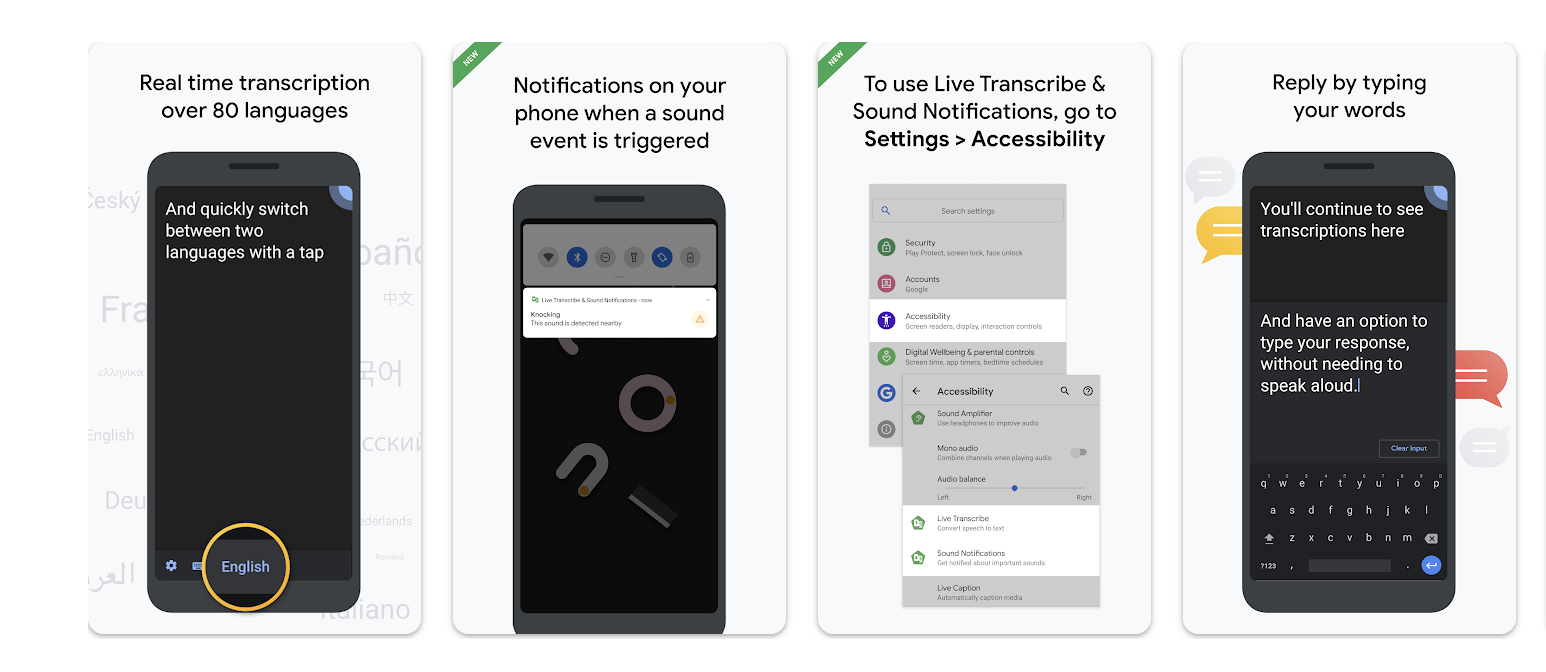
Google Live Transcribe is a free, real-time transcription app developed by Google, primarily aimed at making daily conversations more accessible for individuals who are deaf or hard of hearing.
Leveraging Google's advanced speech recognition technology, it converts spoken language into text on the screen almost instantaneously. The app operates locally on the device, offering a high degree of privacy for conversations.
Key Features
- Real-time, On-Device Transcription: Processes speech and displays text instantly, without sending audio to the cloud for processing.
- Two-Way Conversation: Allows users to speak or type responses, facilitating back-and-forth communication.
- Speaker Indicator: Visually indicates when someone is speaking.
- Vibration Notification: Alerts the user with a vibration when their name is spoken.
- Sound Events: Identifies and displays non-speech sounds like "applause," "laughter," or "dog barking."
- Customizable Text Size: Users can adjust the text display for optimal readability.
- Support for Multiple Languages: Offers transcription in over 80 languages and dialects.
Pros
- Free and Accessible: Free to use, making advanced transcription technology widely available.
- Privacy-Focused: On-device processing ensures that conversations remain private.
- Accuracy: Benefits from Google's extensive speech recognition advancements.
- Language Support: Supports a vast array of languages.
- User-Friendly Design: Simple and straightforward interface.
Cons
- Android Exclusive: Primarily designed for Android
- Limited Export/Saving Options: Not primarily designed for saving and managing extensive transcripts. The app does not include extensive export or long-term transcript management features
- Sound Delays: With some Bluetooth headphones, sound might be delayed or lower quality.
Best For
Google Live Transcribe is best for individuals who are deaf or hard of hearing seeking a free, private, and highly accurate real-time transcription tool for everyday face-to-face conversations. It is also suitable for anyone needing quick, on-the-fly transcription of spoken language without the need for advanced features like speaker identification or extensive export capabilities.
4. Happy Scribe
Overview
Happy Scribe is a professional transcription and subtitling service that offers both automated and human-powered solutions. While it excels in turning audio and video into text and subtitles, its automated transcription service provides live-like capabilities for processing audio files quickly. It is particularly popular among media professionals, content creators, and researchers who require highly accurate transcripts and captions for a variety of media types.
Key Features
- Automated Transcription: Conversion of audio/video to text using AI.
- Human Transcription: Offers professional transcription for critical projects with strict quality requirements.
- Subtitling Services: Automatically generates subtitles in multiple languages, with options for human review and translation.
- Speaker Identification: Distinguishes between different speakers in the audio.
- Timestamping: Adds timestamps to transcripts for easy navigation and reference.
- Multiple Export Formats: Supports various formats including TXT, DOCX, SRT, VTT, JSON, and more.
- API Integration: Allows developers to integrate Happy Scribe's transcription services into their own applications.
Pros
- Accuracy (Automated & Human): Provides automated transcription and human services.
- Language Support: Supports a wide range of languages for both transcription and subtitling.
- Versatile for Media: Works for transcribing audio and video files, including podcasts, interviews, and webinars.
- Efficient for Subtitling: Strong features for creating and managing subtitles, including translation options.
Cons
- Pricing Structure: Can be more expensive for large volumes or human transcription compared to purely AI-driven solutions.
- Credit System: Operates on a credit or minute-based system, requiring users to manage their usage.
Best For
Happy Scribe is best for content creators, media professionals, educators, and researchers who require fast, accurate, and reliable transcription and subtitling services for pre-recorded audio and video content. It is ideal for projects where both automated speed and optional human-level accuracy are needed, especially for producing captions, subtitles, and detailed textual records of media.
5. Trint

Overview
Trint positions itself as an intelligent platform for transforming spoken words into actionable text, targeting journalists, content marketers, and businesses. It offers a hybrid approach, combining advanced AI transcription with a powerful editor and collaboration tools. Trint aims to go beyond simple transcription by making audio and video content fully searchable, editable, and shareable, enhancing the utility of spoken information across various professional workflows.
Key Features
- AI-Powered Transcription: Converts audio and video files into text with high accuracy.
- Interactive Editor: A sophisticated online editor that links audio/video to text, allowing for easy correction, highlighting, and commenting.
- Speaker Identification: Automatically detects and labels different speakers in the transcript.
- Real-time Transcription (for specific integrations): Offers live transcription capabilities when integrated with conferencing tools.
- Collaboration Tools: Allows multiple users to work on the same transcript, making it ideal for team projects.
- Advanced Search Functionality: Enables users to search for specific words or phrases across their entire library of transcripts.
- Export Options: Provides various export formats, including DOCX, SRT, VTT, and more.
- Mobile App: Offers a mobile application for on-the-go recording and transcription.
Pros
- Accuracy: Known for its strong transcription accuracy, particularly with clear audio.
- Powerful Editor: The interactive editor is a standout feature, significantly simplifying the review and editing process.
- Collaborative Features: Excellent for teams working on shared media projects.
- Comprehensive Workflow Integration: Designed to integrate into professional content creation and journalistic workflows.
- Robust Security: Emphasizes data privacy and security for sensitive information.
Cons
- Premium Pricing: Positioned at the higher end of the market, which may be prohibitive for individual users or small budgets.
Best For
Trint is best for journalists, content creators, marketing teams, academic researchers, and businesses that require highly accurate transcription of audio and video, coupled with robust editing, collaboration, and search functionalities.
6. Rev Voice Recorder & Memos

Overview
Rev Voice Recorder & Memos is a mobile application that combines a high-quality voice recorder with integration into Rev's industry-leading human and AI transcription services. While the app itself is free for recording, its primary value proposition lies in its direct gateway to Rev's professional transcription offerings. It's designed for individuals who need audio capture and subsequent accurate transcription for interviews, meetings, lectures, and personal notes.
Key Features
- High-Quality Audio Recording: Captures clear audio directly from your smartphone.
- Easy Ordering of Transcriptions: Seamlessly submit recordings for human or automated transcription directly through the app.
- Playback Control: Offers intuitive playback features to review recordings.
- Offline Recording: Allows users to record audio even without an internet connection.
- File Organization: Helps users manage and categorize their recordings.
- Direct Integration with Rev Services: One-tap access to Rev's transcription services, including real-time options through separate Rev products.
Pros
- Human Transcription: Rev is renowned for its professional human transcription services.
- Mobile Recording: Provides a simple and effective tool for capturing audio on the go.
- Fast Turnaround: Automated transcription delivers results quickly.
- User-Friendly App: The recorder app is straightforward and easy to use.
- Cost-Effective for Recording: The recording app itself is free.
Cons
- Transcription Costs: Transcription services, especially human transcription, are paid and can be more expensive than purely AI-driven solutions.
- App Limitations: The "live transcribe" functionality is not within the recorder app itself but requires ordering a service or using other Rev products for captions close to real-time.
- No Free AI Transcription (within app): While AI services are available, there isn't a free tier for automated transcription directly integrated into the recorder for significant usage.
Best For
Rev Voice Recorder & Memos is best for professionals, journalists, students, and researchers who require high-quality audio recordings and accurate transcripts. It is ideal for those who prioritize accuracy and are willing to invest in professional transcription services, either human or advanced AI, for critical recordings like interviews, focus groups, or important meetings where every word matters.
7. Speechify

Overview
Speechify is primarily known as a text-to-speech (TTS) application, but it has expanded its capabilities to include robust speech-to-text (STT) features. While its core strength remains in converting written text into natural-sounding audio, its STT function allows users to dictate notes, drafts, and emails, effectively turning spoken words into written text.
Key Features
- Speech-to-Text Dictation: Converts spoken words into editable text in real time for note-taking, drafting, and messaging.
- Text-to-Speech (TTS): Reads aloud any text, including documents, articles, emails, and web pages, with customizable voices and reading speeds.
- Multi-Platform Sync: Syncs content and progress across various devices (web, iOS, Android, browser extensions).
- AI-Powered Voices: Offers a wide range of natural-sounding, high-quality AI voices for TTS.
- Document and Web Page Integration: Can directly process text from PDFs, images, web pages, and more.
- Language Support: Supports numerous languages for both TTS and STT functionalities.
Pros
- Dual Functionality: Offers both powerful text-to-speech and speech-to-text capabilities in one platform.
- High-Quality Output: Delivers excellent quality in both audio playback and text transcription.
- User-Friendly Interface: Intuitive design makes it easy to switch between features and manage content.
- Accessibility Features: Enhances accessibility for individuals with reading difficulties or visual impairments.
- Cross-Device Sync: Ensures seamless experience across different devices.
Cons
- Subscription Cost: Premium features and unlimited usage require a subscription, which can be relatively expensive.
- Not Optimized for Multi-Speaker Transcriptions: Speechify’s core product is designed as a text-to-speech and voice dictation tool, not a full transcription platform built specifically for multi-speaker environments. It turns written text into audio and offers voice typing, but it does not emphasize automated speaker attribution as a core feature.
Best For
Speechify is best for individuals who need a versatile tool for both text-to-speech and speech-to-text. It's ideal for students, writers, professionals, and anyone who wants to quickly dictate notes, emails, or documents, as well as consume written content audibly.
8. Microsoft Dictate
Overview
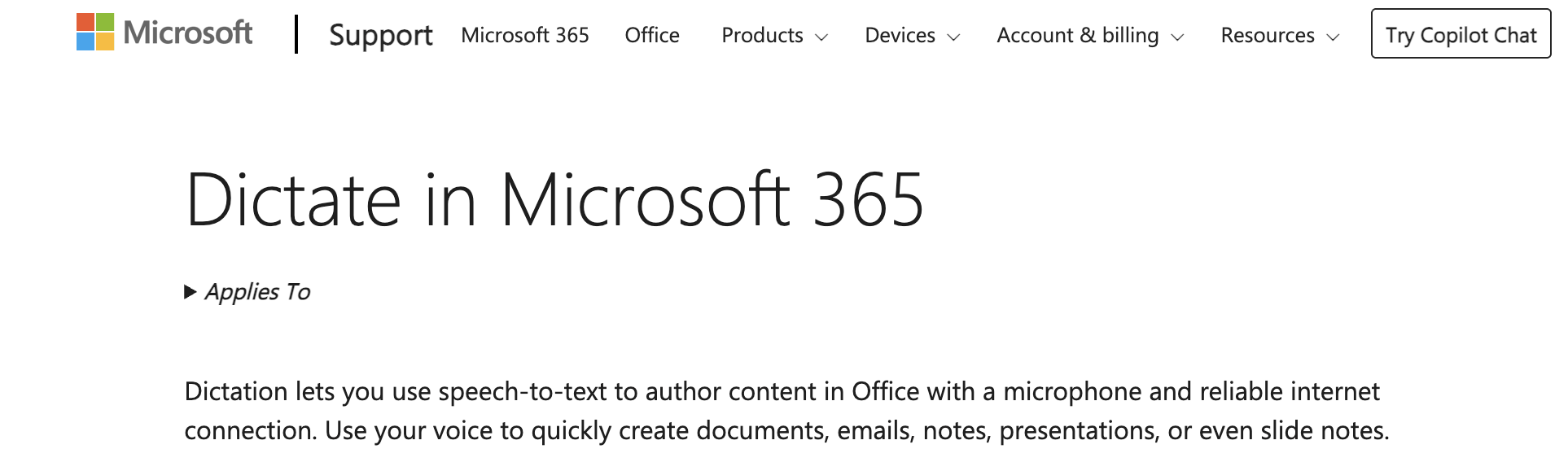
Microsoft Dictate is a free add-in for Microsoft Office applications (Word, Outlook, PowerPoint) and a built-in feature in Windows 10/11, leveraging Microsoft's speech recognition technology. It allows users to dictate text directly into their documents, emails, and presentations, transforming spoken words into written content in real time. Microsoft Dictate integrates into the existing Microsoft ecosystem.
Key Features
- Real-time Dictation: Converts spoken language into text directly within Microsoft Office applications.
- Voice Commands: Supports specific voice commands for punctuation, formatting, and navigation (e.g., "new paragraph," "period," "delete that").
- Multi-language Support: Recognizes and transcribes in multiple languages.
- Customizable Settings: Allows users to adjust microphone input, language settings, and other preferences.
- Built-in to Windows: Available as a system-wide feature in modern Windows operating systems, often called "Windows Speech Recognition."
- Free for Office Users: Included as a standard feature or free add-in for Microsoft Office subscribers.
Pros
- Office Integration: Works directly within familiar Microsoft applications, requiring no extra setup for many users.
- Free (for Office Users): Provides valuable dictation functionality at no additional cost for Microsoft 365 subscribers.
- Accuracy: Generally offers reliable speech recognition, especially with clear diction.
- Voice Commands: Enhances productivity by allowing hands-free formatting and editing.
- Privacy Conscious: Microsoft maintains high standards for data privacy, especially for enterprise users.
Cons
- Limited Scope: Primarily focused on dictation within Microsoft applications rather than transcribing live conversations or meetings from external sources. Microsoft describes the Dictate feature as a tool that lets you use your voice to create documents, emails, notes, etc. in Microsoft 365 apps like Word, Excel, Outlook, and PowerPoint. It does not describe this feature as a meeting or live conversation transcription tool.
- Requires clear speech: Microsoft 365 Dictate’s speech-to-text accuracy is influenced by audio quality and speaking clarity. Guides for using voice dictation recommend minimizing background noise and using a quality microphone to improve results, and independent reviews note that the feature may not perform perfectly with strong accents or noisy environments.
Best For
Microsoft Dictate is best for Microsoft Office users (students, professionals, administrative staff) who need a convenient and efficient way to dictate documents, emails, and presentations directly within their familiar applications.
9. A.I. Transcriber: Speech to Text (iOS)

Overview
A.I. Transcriber: Speech to Text (iOS) is a mobile application for Apple devices that leverages advanced artificial intelligence to provide real-time and post-recording transcription services. It aims to offer a straightforward and effective solution for iPhone and iPad users to convert spoken words into text. The app often emphasizes ease of use and high accuracy, catering to a broad audience from students taking notes to professionals documenting meetings.
Key Features
- Real-time Transcription: Converts live spoken audio into text instantly on your iOS device.
- Audio File Transcription: Allows users to upload and transcribe pre-recorded audio files.
- Accuracy AI: Utilizes sophisticated AI models for reliable speech recognition.
- Language Support: Offers transcription in various languages.
- Editing Tools: Provides basic editing capabilities for correcting transcripts.
- Export Options: Enables users to export transcripts in formats like plain text or share them via other apps.
- Speaker Detection (sometimes available): Advanced versions may include features to differentiate speakers.
Pros
- iOS Native: Optimized for performance and user experience on Apple devices.
- User-Friendly Interface: Typically features a clean and intuitive design, making it easy to navigate.
- Good for Mobile Use: Excellent for on-the-go recording and transcription, using the device's microphone.
- Quick Turnaround: Automated transcription ensures fast results for both live and recorded audio.
- Convenient for Personal Use: Ideal for quickly capturing thoughts, memos, or short discussions.
Cons
- Subscription Model: Many feature-rich versions of these apps operate on a subscription basis.
Best For
A.I. Transcriber: Speech to Text (iOS) is best for iPhone and iPad users who need a dedicated, reliable, and easy-to-use mobile application for real-time transcription of personal notes, short meetings, interviews, or lectures. It is particularly suitable for individuals who primarily work within the Apple ecosystem and prefer a mobile-first approach to transcription.
10. Speechnotes

Overview
Speechnotes is a free, web-based speech-to-text tool that functions directly in your browser. It stands out for its simplicity and immediate usability, requiring no downloads, installations, or sign-ups. Leveraging Google's powerful speech recognition engine, Speechnotes provides continuous, real-time dictation, making it an accessible option for anyone needing to quickly convert spoken words into text for documents, emails, or notes.
Key Features
- Continuous Live Dictation: Offers uninterrupted speech-to-text transcription as you speak.
- Browser-Based: Works entirely within your web browser (Chrome recommended for optimal performance).
- No Login Required: Users can start transcribing immediately without creating an account.
- Automatic Saving: Automatically saves transcribed text to prevent data loss.
- Punctuation Commands: Supports voice commands for adding punctuation and basic formatting.
- Multi-language Support: Recognizes and transcribes in many different languages.
- Offline Functionality (limited): Some basic functionality might work offline if language packs are downloaded.
Pros
- Free: Offers a valuable service at no cost, making it highly accessible.
- Extremely Easy to Use: Minimalist interface and no setup required.
- Accuracy: Benefits from Google's robust speech recognition technology.
- Privacy-Friendly: No account creation means less personal data collection.
- Portable: Accessible from any computer with an internet connection and a microphone.
Cons
- Limited Features: Lacks advanced features like speaker identification, robust editing tools, or integration with other apps.
- Basic Export Options: Primarily for plain text output, with fewer advanced export formats.
- No Multi-Speaker Support: Not designed for transcribing complex conversations with multiple participants.
Best For
Speechnotes is best for individuals who need a free, quick, and easy-to-use web-based tool for transcribing personal notes, drafting emails, writing documents, or dictating short passages. It's ideal for casual users, students, or anyone looking for an immediate solution for converting speech to text without the need for complex features or installations.
11. Dragon Anywhere

Overview
Dragon Anywhere is a mobile dictation solution with speech-to-text capabilities on iOS and Android devices. Unlike standard dictation tools, Dragon Anywhere is designed for professional use, allowing users to dictate documents of any length, edit, and format them entirely by voice, and then export them to popular applications. It leverages a personalized speech engine that adapts to your voice over time for improved accuracy.
Key Features
- Continuous Dictation: Allows for dictation of documents of any length without time limits.
- Professional-Grade Accuracy: Delivers high accuracy, especially after personalization and training.
- Voice Commands: Comprehensive set of voice commands for formatting, editing, and navigating documents.
- Customization: Users can create custom words, commands, and auto-texts (boilerplate text) to streamline workflows.
- Cloud-Based Profile: Your personalized voice profile syncs across devices, ensuring consistent accuracy.
- Export Options: Easily share dictated text to popular note-taking apps, cloud storage, or email.
- Industry-Specific Vocabularies: Offers optional specialized vocabularies for legal, medical, and other professions.
Pros
- Accuracy: Accurate mobile dictation tool.
- Customization: Personalization for words, commands, and text.
- Unlimited Dictation: No limits on the length of dictation, suitable for long reports or documents.
- Professional Focus: Tailored for business professionals, lawyers, doctors, and other demanding users.
- Syncs Across Devices: Personalized profile ensures a consistent experience on multiple mobile devices.
Cons
- Subscription Required: A premium service with a monthly or annual subscription fee, which can be costly.
- Not for Multi-Speaker Transcription: The Dragon Anywhere user guide explicitly states that the app adapts to your voice and that other people shouldn’t dictate under your login because doing so degrades accuracy. It notes that each speaker needs their own account if they want to use it, which is a clear indication it isn’t built for multiple voices in one session.
Best For
Dragon Anywhere is best for professionals, such as lawyers, medical practitioners, law enforcement, and executives, who require highly accurate, continuous, and customizable dictation on their mobile devices. It is ideal for individuals who need to produce detailed reports, documents, and emails quickly and efficiently using voice, especially those with industry-specific terminology.
How We Evaluated Live Transcribe Apps for 2026
Our evaluation process for the best live transcribe apps in 2026 was rigorous and multifaceted, designed to provide you with comprehensive and reliable recommendations. We focused on several key criteria to assess each application's performance, utility, and overall value.
Accuracy
Accuracy is paramount for any transcription service.
We tested each app's ability to precisely convert spoken words into text, considering various audio conditions, including different accents, speaking speeds, and background noise levels. Our evaluation included metrics such as Word Error Rate (WER) and the correct identification of punctuation and capitalization.
We prioritized apps that consistently demonstrated high accuracy, even in challenging environments.
Real-time Performance
For live transcription, real-time performance is critical.
We assessed the latency between spoken audio and the appearance of its transcribed text. Apps that offered near-instantaneous transcription, without significant delays, scored higher.
This criterion is vital for maintaining the flow of conversations and ensuring the transcribed text remains synchronized with the live audio feed.
Platform Compatibility
In today's interconnected world, platform compatibility is essential. We examined whether the apps were available and performed optimally across a range of devices and operating systems, including iOS, Android, Windows, macOS, and web browsers.
Applications with broad compatibility ensure users can access their transcription services regardless of their preferred device or ecosystem.
Language Support
Language support is a significant differentiator. We evaluated the number of languages and dialects each app could accurately transcribe. High marks were given to apps that offered extensive multilingual capabilities, including the ability to detect and switch between languages in real time, catering to a global user base.
Features and Integrations
Beyond basic transcription, we looked at the breadth and utility of features and integrations. This included speaker identification, timestamping, export options (e.g., plain text, SRT, DOCX), search functionality, editing tools, and integrations with other productivity tools like calendar applications, video conferencing platforms, or cloud storage services. Innovative features that enhanced productivity or accessibility were particularly noted.
Pricing and Value
Pricing and value were assessed in relation to the features offered and the target audience. We considered various pricing models, including free tiers, subscription plans, and pay-as-you-go options. Our evaluation focused on identifying apps that provided a strong balance between cost and the value delivered, ensuring that users receive a substantial return on their investment.
User Interface and Experience
A clean and intuitive user interface and experience (UI/UX) contribute significantly to an app's usability. We evaluated the ease of navigation, clarity of controls, and overall aesthetic appeal. Apps with a streamlined design that allowed users to quickly initiate, manage, and retrieve transcriptions without unnecessary complexity were favored. The learning curve for new users was also a key consideration.
Factors to Consider When Choosing a Live Transcribe App
Selecting the most suitable live transcribe app involves careful consideration of several factors beyond just the core functionality. Your specific context and requirements will heavily influence which application provides the most value.
Your Specific Needs
First, clearly define your specific needs.
Are you primarily looking to transcribe phone calls, in-person conversations, virtual meetings, lectures, or personal notes?
Do you require multi-speaker identification, or is single-speaker dictation sufficient?
For example, if you are deaf or hard of hearing, an app like Nagish Live Transcribe would be paramount due to its accessibility-focused design. Also, for students who might prioritize a free option with good accuracy for lectures, Nagish is a solid choice.
Accuracy Requirements
Accuracy requirements are critical. While AI has made significant strides, no automated transcription is 100% perfect. For casual notes, a high-80s to low-90s accuracy might be acceptable. However, for legal documentation, medical records, or published content, near-perfect accuracy. Apps that offer speaker differentiation, punctuation, and context understanding tend to provide higher effective accuracy.
Budget
Your budget is another significant factor. Live transcribe apps range from entirely free (like Nagish Live Transcribe to subscription services (like Otter.ai, Trint, or Dragon Anywhere). Evaluate the cost against the value and features provided, and consider whether a free tier meets your initial requirements before committing to a subscription.
Privacy and Security
Privacy and security are paramount, especially when transcribing sensitive conversations. Understand how each app handles your audio data and transcripts.
Does it process audio on-device or is it sent to cloud servers for processing? What are the data retention policies? Is the data encrypted in transit and at rest?
For industries with strict compliance regulations (e.g., healthcare, legal), choosing an app with robust security protocols and clear data handling policies is non-negotiable. In this matter, Nagish guarantees 100% private, secure, and ad-free captioning that runs on your phone locally.
Integration with Other Tools
Finally, consider integration with other tools and devices you already use. Does the app connect with your calendar, video conferencing platforms (Zoom, Google Meet, Microsoft Teams), cloud storage (Google Drive, Dropbox), or CRM systems? Does the app also offer Bluetooth connectivity to pair with hearing aids?
Integrations can significantly streamline your workflow, allowing for automatic meeting transcription, easy document sharing, or direct saving of notes to your preferred productivity suite. Apps like Nagish Live Transcribe excel in this area.
The Future of Live Transcription Technology
The landscape of live transcription technology is evolving rapidly, driven by continuous advancements in artificial intelligence and machine learning. Looking ahead to 2026 and beyond, we can anticipate significant innovations that will further enhance the capabilities, accessibility, and integration of these tools.
Advancements in AI and Machine Learning
The core of live transcription technology lies in AI and machine learning (ML), particularly in natural language processing (NLP) and automatic speech recognition (ASR). Future advancements will lead to even higher levels of accuracy, especially in challenging environments. We can expect ASR models to become more adept at handling:
- Complex Acoustics: Better performance in environments with significant background noise, multiple overlapping speakers, and varying distances from the microphone.
- Accent and Dialect Recognition: Enhanced ability to accurately transcribe a wider range of accents and regional dialects, reducing bias and improving inclusivity.
- Contextual Understanding: AI will not just transcribe words but increasingly understand their meaning within context, leading to more intelligent punctuation, proper noun identification, and even sentiment analysis.
- Speaker Diarization: More robust and accurate speaker identification, distinguishing between speakers even with similar voices or when speaking over each other.
- Real-time Language Switching: Seamless and automatic detection and transcription of conversations that switch between multiple languages mid-sentence.
These AI improvements will result in transcripts that are virtually indistinguishable from human-generated ones, while maintaining the speed and cost-effectiveness of automated systems.
Enhanced Language Capabilities
The global nature of communication demands extensive language support. Future live transcription apps will feature enhanced language capabilities, moving beyond just recognizing dominant languages. This will include:
- Expanded Language and Dialect Support: A significant increase in the number of supported languages, including less common and indigenous languages.
- Improved Multilingual Processing: More sophisticated algorithms that can process and translate spoken language in real time across multiple languages simultaneously. Imagine a meeting where participants speak different languages, and the transcript displays both the original language and a real-time translation for each speaker.
- Cultural Nuance Recognition: AI models will become more attuned to cultural nuances in language, recognizing idioms, slang, and culturally specific references, ensuring more accurate and contextually relevant transcriptions.
These advancements will break down communication barriers, fostering greater global collaboration and understanding.
Integration with Smart Devices
The pervasive nature of smart devices will lead to deeper and more seamless integration of live transcription technology into our daily lives.
- Wearable Technology: Smart glasses, hearing aids, and other wearable devices will incorporate real-time transcription, providing discreet captions of conversations directly in the user's field of vision or audio feed. This will be a game-changer for accessibility.
- Smart Home and Office Integration: Live transcription will become a standard feature in smart speakers, smart displays, and video conferencing hardware, automatically transcribing conversations in rooms for meeting summaries, accessibility, or voice command interactions.
- Automotive Integration: In-car systems will offer live transcription capabilities for phone calls, voice notes, and even passenger conversations, enhancing safety and productivity on the go.
- Edge AI Processing: More processing will occur directly on devices (edge AI) rather than solely in the cloud, improving privacy, reducing latency, and enabling offline transcription capabilities for a wider range of devices.
These integrations will make live transcription an ambient technology, available whenever and wherever spoken communication occurs, fundamentally transforming how we interact with information and each other.
Conclusion
The evolution of live transcribe applications continues to redefine accessibility and productivity across various domains. From enhancing communication for individuals with hearing impairments to streamlining professional workflows and facilitating global interactions, these tools are indispensable in 2026. Our comprehensive evaluation, based on critical factors such as accuracy, real-time performance, platform compatibility, language support, features, pricing, and user experience, has highlighted a diverse range of top-tier applications.
Whether your priority is Nagish Live Transcribe's dedicated accessibility for phone calls, day-to-day conversations, public announcements, and public event participation, there is a solution tailored to your specific requirements.
As you consider your options, remember to align your choice with your specific needs, accuracy demands, budget, privacy concerns, and integration preferences. The future promises even more sophisticated AI-driven advancements, including enhanced language capabilities and deeper integration with smart devices, further cementing live transcription technology as a cornerstone of modern communication. By leveraging these powerful tools, you can unlock greater accessibility, efficiency, and clarity in all your spoken interactions.


Copywriter based in Miami, FL. Leads copywriting workshops and mentors women entrepreneurs at the Idea Center of Miami Dade College.