Best Apps for Hearing Loss in 2026
What are the best hearing loss apps for clearer communication during phone calls and conversations? This guide explains how they work and when to use them.


Hearing changes are more common than many people realize. More than 50 million Americans have some degree of hearing loss, according to HLAA (based on NIDCD and U.S. Census data). Whether that shows up during phone calls, in noisy environments, or in fast-moving conversations.
Today, there are smartphone apps designed to support clearer communication, offering tools like call captions, live conversation text, sound awareness, and hearing aid control.
That’s why many people use app-based hearing support tools today. Not as a replacement for hearing, but as situational support when clarity matters.
Here is an overview of the best hearing loss apps in 2026 that support communication for people with hearing changes, including phone captioning and live speech transcription tools.
Nagish

Nagish is an FCC-certified app that provides real-time captions for phone calls and in-person conversations using AI-powered speech-to-text technology.
Unlike traditional relay services that rely on human stenographers or third-party operators, Nagish keeps everything private and automatic since captions are generated directly on your device and are fully secure.
Nagish works like your normal phone app, but with captions and transcripts available in real time, giving you the speech text as you talk or listen. Transcripts are stored locally so you can review important details later without compromising privacy.
Nagish supports Bluetooth connectivity with hearing aids, cochlear implants, and other listening devices. Once your hearing device is paired via your phone’s Bluetooth settings, Nagish can route audio through your device while still showing captions on your screen.
Nagish includes a range of features designed to make phone conversations easier to follow without changing how people normally communicate.
Users can keep and use their existing phone number, create a personal dictionary for names or frequently used terms, and save call transcripts locally for later reference. The app also offers spam and profanity filtering to reduce unwanted interruptions, along with the option to type responses instead of speaking when preferred. Together, these features support clarity while keeping the experience private and familiar.
In addition to captioning calls, Nagish also includes Nagish Live, an additional feature that is available at no cost for its community and captures live speech in everyday places like crowded restaurants, meetings, or events, displaying captions directly on your screen.
It can be launched with one tap, allows users to customize text size and layout, and supports Bluetooth-connected devices, such as hearing aids or external microphones, to improve speech capture in noisy environments.
Many users describe Nagish as a practical tool that fits naturally into daily communication. One iOS App Store reviewer shared, “I just started using Nagish and I couldn’t be more thrilled with the results! I have hearing loss & now know that Nagish will be of invaluable assistance to me.”
Nagish also offers a suite of support resources to help you get the most out of the app. If you’re new to the interface or want to learn tips for real-world use, Nagish’s video tutorials walk through key features and show how easy it is to navigate both call captioning and Nagish Live.
In addition to tutorials, Nagish also features The Audiologist Hub, a collection of articles that explain hearing support topics in plain language, and the Free Online Hearing Test, which can help you check your hearing sensitivity from home. Both can be useful whether you’re exploring captioning for the first time or looking to better understand your listening needs.
InnoCaption

InnoCaption provides real-time phone captions and allows users to choose between AI-generated captions or live human captioning. Calls are placed through the service, which may introduce delays compared with standard call routing.
The app also supports Bluetooth connectivity with hearing aids and cochlear implants when making calls.
InnoCaption is often chosen by users who prefer the option of live human captioning in addition to AI-generated captions. Because calls are routed through the service rather than placed directly, some users may notice slight delays or a less natural call flow compared with standard phone calls.
Ava
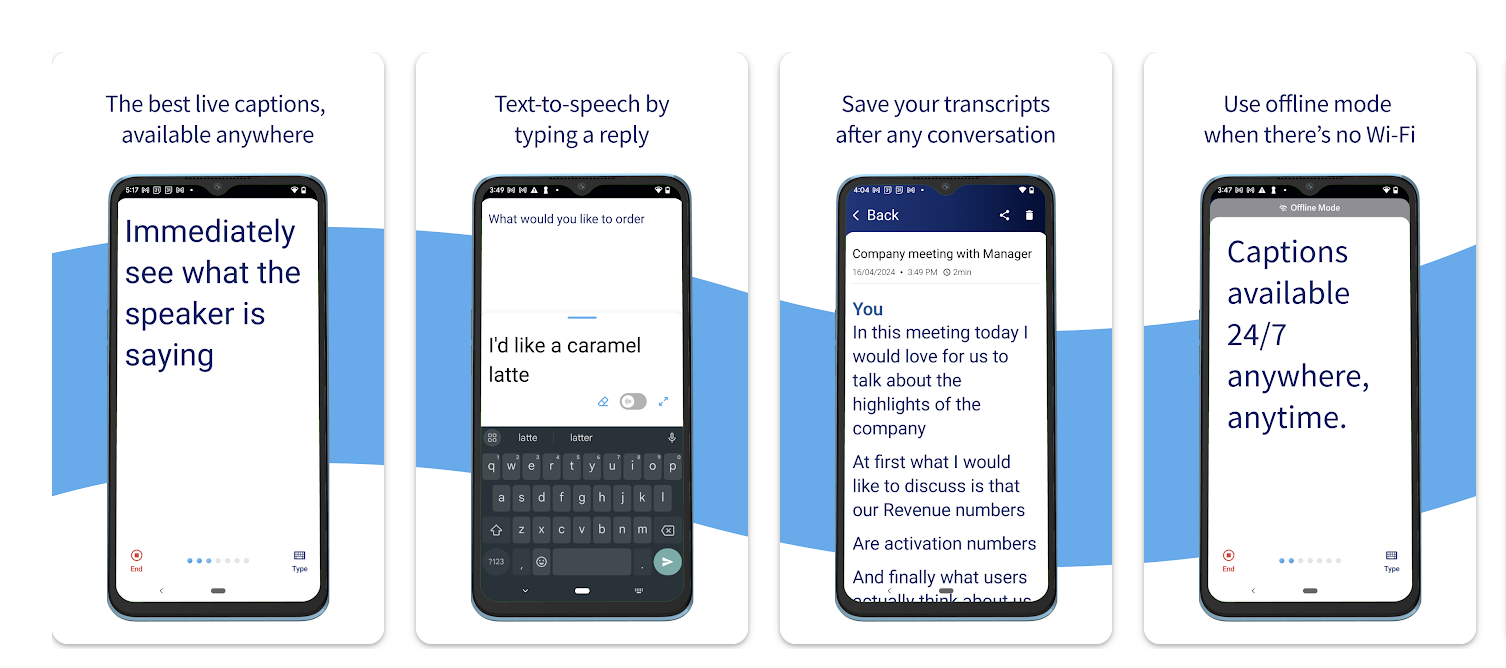
Ava transcribes live in-person conversations in group settings but does not support phone call captions.
As a result, people who rely on captions for both calls and in-person conversations may need to switch between different apps depending on the situation.
Ava is typically used as a situational solution rather than an all-in-one communication tool, particularly for environments where live transcription on a shared screen helps support understanding.
Google Live Transcribe (Android)
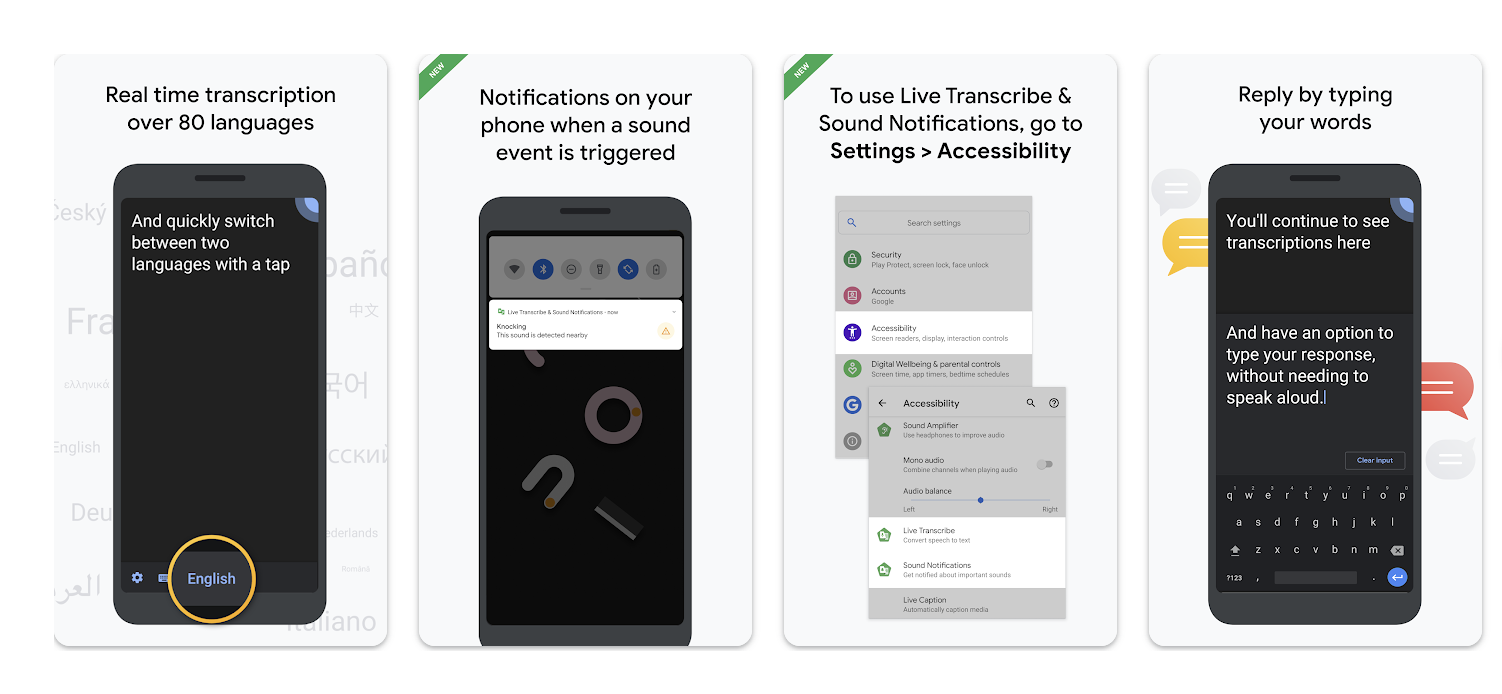
Google Live Transcribe is a built-in Android accessibility feature that provides real-time captions for in-person conversations, lectures, and events. Because it’s integrated into the Android operating system, it’s available without downloading a separate app.
Live Transcribe is designed specifically for live, in-person speech and does not support captioning for standard phone calls or two-way call management. It’s also only available on Android devices, meaning iOS users cannot access this feature and would need to use a different tool for in-person captioning.
As a result, Live Transcribe is most often used as a complementary tool rather than a primary communication solution.
iPhone Sound Recognition
Some apps focus on helping users stay aware of important sounds in their environment, especially at home. Built into iOS, this feature alerts users to sounds like doorbells, alarms, or baby cries.
iPhone Sound Recognition uses on-device machine learning to identify specific everyday sounds and notify users when they occur. Alerts appear as visual notifications on the screen and can also trigger vibrations, making it easier to stay aware without relying on hearing alone.
Users can customize which sounds they want to be notified about, such as doorbells, smoke alarms, sirens, appliances, or crying babies. Because this feature runs directly on the device, it’s designed with privacy in mind and does not store or share audio recordings.
Sound Recognition works best in quieter home environments and is intended for awareness and safety—not for understanding speech or conversations. Many people use it alongside captioning or transcription apps to cover different communication needs.
Android Sound Notifications
Android Sound Notifications offer a similar awareness-focused feature, using the phone’s microphone to detect important environmental sounds and alert users through visual notifications, vibrations, or connected wearables.
Users can choose which sounds they want to be notified about, including door knocks, alarms, baby cries, or emergency signals. Notifications can also be sent to paired smartwatches, allowing users to stay aware even when their phone isn’t nearby.
Like iPhone Sound Recognition, this feature is designed for situational awareness and safety rather than speech understanding. It’s most effective at home or in familiar environments and is often used alongside apps that provide captions for calls or live conversations.
What to consider before choosing a hearing app
A few practical details can make a big difference in how useful an app feels day to day.
Privacy
Some apps process speech directly on your device, while others rely on cloud servers. If privacy matters to you, it’s worth understanding where your conversations are processed and stored. For example, Nagish keeps all your conversations and transcripts 100% private. Now that’s peace of mind.
Caption delay (latency)
Even a small delay can make phone calls harder to follow. Apps with lower latency feel more natural, especially during fast-paced or back-and-forth conversations.
Battery usage
Real-time captioning and transcription can be demanding. Battery impact varies by app, particularly when using Bluetooth or live transcription for longer periods.
Internet dependency
Some features require a strong, consistent internet connection. If you’re often on the go or in areas with spotty service, this can affect reliability.
Accuracy in noisy environments
Background noise, overlapping voices, and distance from the speaker can all affect caption accuracy. Apps that support external microphones or Bluetooth-connected devices may perform better in these settings.
While the apps above focus on turning speech into readable text or increasing awareness, another category of apps is designed to work specifically with hearing devices themselves.
How to choose the right hearing loss app in 2026
Not all hearing apps solve the same problem. The right one depends on when communication breaks down for you, not just on the app’s popularity or feature list.
Here’s a simple way to narrow it down:
Phone calls
Look for call captioning apps like Nagish that provide real-time text during phone conversations, so you can read what’s being said as you listen or speak.
In-person conversations
Live transcription apps like Nagish Live Transcribe can display spoken words on your screen during meetings, social gatherings, or one-on-one conversations.
Noisy environments
Apps that support Bluetooth connectivity or external microphones can help capture speech more clearly in restaurants, events, or group settings.
At-home awareness
Sound recognition and notification features alert you to important sounds like doorbells, alarms, or baby cries, adding an extra layer of safety.
Hearing aids or cochlear implants compatibility
Many people use hearing aid companion apps alongside captioning apps, combining amplified sound with visual support for better overall clarity.
Some people rely on one type of app every day. Others switch tools depending on the situation. The best option is the one that fits naturally into your daily life and supports communication when you need it most.

Hearing aid apps and call-captioning apps are designed to solve different communication challenges, even though they’re sometimes grouped together.
Hearing aid companion apps (such as myPhonak, Oticon Companion, ReSound Smart 3D, or Signia App) are built to control and personalize hearing devices. They allow users to adjust volume, switch sound programs, stream audio from a phone, and manage how amplified sound is delivered through their hearing aids. These apps focus on how sound is heard and are most useful for people who already wear compatible hearing aids.
Call-captioning apps, like Nagish, focus instead on turning speech into readable text. Rather than amplifying sound, they provide real-time captions for phone calls (and, in some cases, live conversations), helping users see what’s being said even when audio clarity is limited.
These apps can be used with or without hearing aids and are often chosen when amplification alone isn’t enough, such as during phone calls, in noisy environments, or when speech is difficult to follow.
In practice, many people use both: hearing aids (and their companion apps) to improve sound, and captioning apps to provide visual support when clarity matters most. The two approaches complement each other, addressing different aspects of communication rather than replacing one another.
A practical takeaway
Using a hearing support app doesn’t need to mean anything beyond this: you’re choosing tools that make communication easier.
Some people use these apps every day.
Others only turn them on in specific situations.
Many simply like knowing the option is there.
If phone calls or live conversations sometimes take more effort than you’d like, tools like these can offer extra clarity, only when you want it. You can explore Nagish for free, or simply use this list as a starting point to find what works best for you.


Copywriter based in Miami, FL. Leads copywriting workshops and mentors women entrepreneurs at the Idea Center of Miami Dade College.